defaults write com.apple.finder AppleShowAllFiles TRUE
defaults write com.apple.finder AppleShowAllFiles FALSE
Showing posts with label terminal. Show all posts
Showing posts with label terminal. Show all posts
Friday, October 30, 2009


Tuesday, June 2, 2009
[Terminal]-study memo
Terminal study memo (OSX Leopard)
source:
MACPOWER Vol.4 (アスキームック)
Terminal Tutorial (YouTube) posted by a boy who is around 12...IMPRESSIVE!
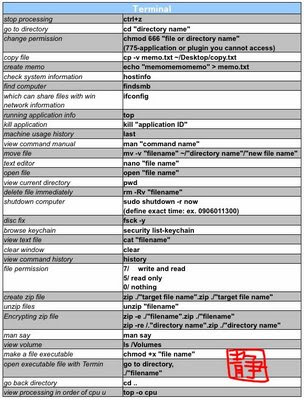
ctrl+z
go to directory:
cd "directory name"
change accessibility:
chmod 666 "file or directory name"
(775-application or plugin you cannot access)
copy file:
cp -v memo.txt ~/Desktop/copy.txt
create memo:
echo "memomemomemo" > memo.txt
check system information:
hostinfo
find computer which can share files with windows:
findsmb
network information:
ifconfig
running application info:
top
kill application:
kill "application ID"
machine usage history:
last
view command manual:
man "command name"
move file:
mv -v "filename" ~/"directory you want to copy"/"new file name"
text editor:
nano "file name"
open file:
open "file name"
view current directory:
pwd
delete file immediately:
rm -Rv "filename"
shutdown computer:
sudo shutdown -r now
(define exact time: ex. 0906011300)
disc fix:
fsck -y
browse keychain:
security list-keychain
view text file:
cat "filename"
clear window:
clear
view command history:
history
file permission:
7/ write and read
5/ read only
0/ nothing
create zip file:
zip ./"target file name".zip ./"target file name"
note: you can add any files to existing zip file whenever you want.
unzip files
unzip "filename"
Encrypting zip file
zip -e ./"filename".zip ./"filename"
zip -re /."directory name".zip ./"directory name"
man say
view volume
ls /Volumes
make a file executable
chmod +x "file name"
open executable file with Terminal
go to directory,
./"filename"
go back directory
cd ..
view processing in order of cpu usage percent
top -o cpu
source:
MACPOWER Vol.4 (アスキームック)
Terminal Tutorial (YouTube) posted by a boy who is around 12...IMPRESSIVE!


ctrl+z
go to directory:
cd "directory name"
change accessibility:
chmod 666 "file or directory name"
(775-application or plugin you cannot access)
copy file:
cp -v memo.txt ~/Desktop/copy.txt
create memo:
echo "memomemomemo" > memo.txt
check system information:
hostinfo
find computer which can share files with windows:
findsmb
network information:
ifconfig
running application info:
top
kill application:
kill "application ID"
machine usage history:
last
view command manual:
man "command name"
move file:
mv -v "filename" ~/"directory you want to copy"/"new file name"
text editor:
nano "file name"
open file:
open "file name"
view current directory:
pwd
delete file immediately:
rm -Rv "filename"
shutdown computer:
sudo shutdown -r now
(define exact time: ex. 0906011300)
disc fix:
fsck -y
browse keychain:
security list-keychain
view text file:
cat "filename"
clear window:
clear
view command history:
history
file permission:
7/ write and read
5/ read only
0/ nothing
create zip file:
zip ./"target file name".zip ./"target file name"
note: you can add any files to existing zip file whenever you want.
unzip files
unzip "filename"
Encrypting zip file
zip -e ./"filename".zip ./"filename"
zip -re /."directory name".zip ./"directory name"
man say
view volume
ls /Volumes
make a file executable
chmod +x "file name"
open executable file with Terminal
go to directory,
./"filename"
go back directory
cd ..
view processing in order of cpu usage percent
top -o cpu
Subscribe to:
Posts (Atom)